 | ||
Introduction
Navigating the functionalities of SCView efficiently is crucial for maintaining a smooth workflow within any organization. One such functionality is recalling documents. This feature is designed to help users manage their documents more effectively by allowing the retrieval and amendment of documents that are still within the workflow process. Understanding when and how to use recall, who can access this feature, and what constraints might apply, is essential for optimizing document management practices. This FAQ aims to address common questions and provide clear guidelines on the use of the recall function in SCView, ensuring all users are equipped to handle their documents correctly and efficiently.
FAQ:
Does everyone have access to recall?
Yes
Can anyone recall my document?
If they have search, they can recall your document.
The recall button/menu is greyed out, why?
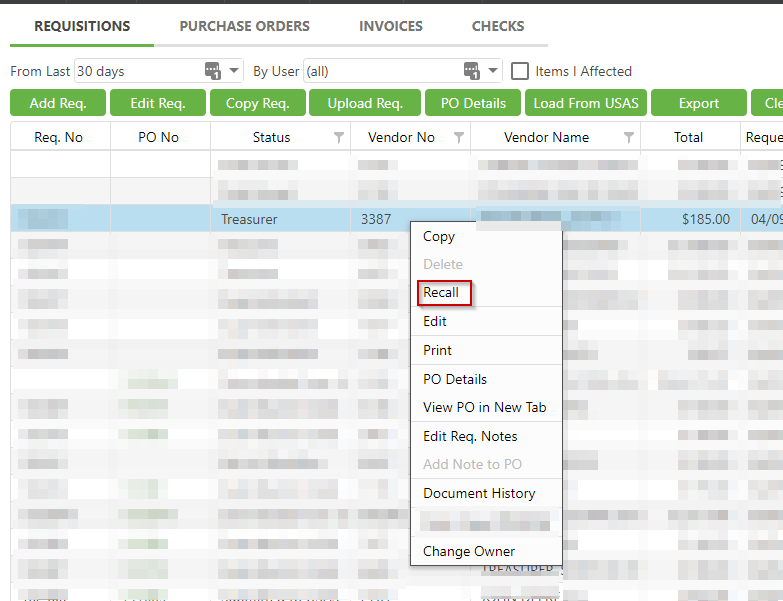
To use recall, the document has to be in a workflow. Right click the requisition and you will see it in the menu.
When should I use recall?
You should recall a document if you find an error with your document and you wish to fix it and then send back into workflow.
I'm an approver, should I use recall?
No. You would use the Return action and state the reason why it was returned.
Do I get notified if my document was recalled?
No. This is why recall should only be used by the requestor. When a document is returned, you will receive an email stating why it was returned.
Related Articles
Requisitions: Create a Requisition
Requisitions: Items I Affected
Requisitions: Extras that go with Requisitions
Was this article helpful?
That’s Great!
Thank you for your feedback
Sorry! We couldn't be helpful
Thank you for your feedback
Feedback sent
We appreciate your effort and will try to fix the article