
 | ||
1. Introduction
The Requisitions module is a streamlined platform that simplifies the process of requesting and approving the purchase of goods and services within an organization. It allows users to create purchase requests, route them through the appropriate approval channels, and manage budgets effectively. With real-time tracking and the ability to convert approved requisitions into purchase orders, the module ensures a controlled, transparent, and efficient procurement workflow, aiding organizations in maintaining fiscal discipline and operational efficacy.
2. FAQ
How can I submit requisitions for the next fiscal year in SCView?
To submit requisitions for the next fiscal year in SCView, please follow these steps:
- In SCView, navigate to Site Settings > Requisitions. There is an option to ignore the budgets for the next fiscal year if they have not been set yet. Be sure to apply any changes you make in this section.
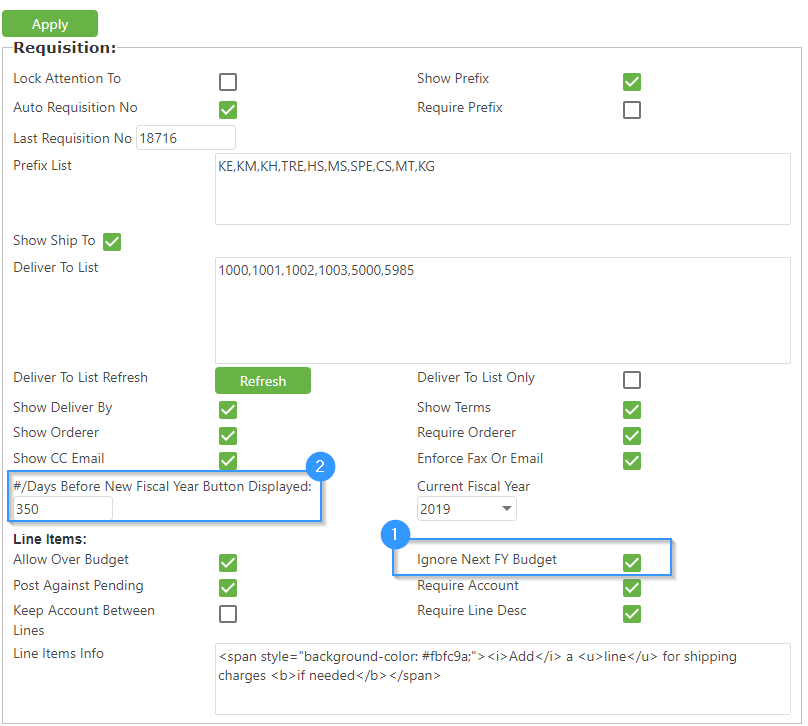
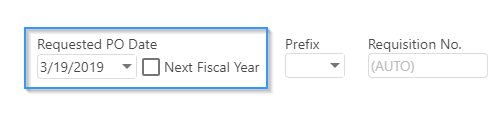
- Open the requisition form where you'll find a checkbox next to the PO date. Check this box if you wish to ignore the current budget while submitting your requisition. This will also set the PO date to July 1st of the next fiscal year. If the checkbox is not visible, adjust the setting for the number of days before the new fiscal year to make it appear.
- If enabled, the workflow system may filter and hold these requisitions in a queue with a name such as "Pending next FY," "Pending Conversion," etc. The requisitions will stay in this holding pattern until you're ready to convert them to POs.
- Once you're ready to convert the held requisitions to POs, navigate to the workflow and use the action item to move them back into the standard workflow process for completion and approval.
Remember to ensure that any requisitions for the next fiscal year are processed in accordance with your district or organization's specific policies and timelines.
Can I edit a requisition after submitting it?
The ability to edit a requisition might vary by system and organizational policy. Usually, you can edit a requisition before it gets approved. Once approved, however, you may need to recall the requisition out of the approval workflow to make any necessary changes.
What happens once my requisition is approved?
Once your requisition is approved, it typically moves forward in the procurement cycle and may be converted into a purchase order (PO) to be sent to the vendor. The procurement or purchasing department usually handles this process, and you'll be notified when the order is placed.
3. Related Articles