
 | ||
Introduction
Effective data entry and document management often necessitate clear visibility and readability of interface text. In SCView, the Index window serves as a critical tool for accurately inputting and viewing document indices. To cater to the diverse visual preferences of users, SCView provides an option to customize text size within the Index window.
A. Problem Statement
Users may sometimes find the default text size in the Index window challenging to read, which can lead to errors in data entry or strain during extended use. This issue can impact productivity and accuracy in document management tasks.
B. Solution
To address this issue, SCView enables users to adjust the text size and font type in the Index window easily. By accessing the customization settings through the "pencil" icon, users can select their preferred font type and size for both the Label and Input Box, ensuring optimal readability and comfort.
If you find that your Index window text is hard to read, you have the ability to change the text size. You can change the text size by clicking on the "pencil" icon in the upper-right corner of the Index window.
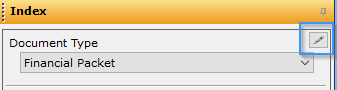
Once the icon is clicked, a new popup window will appear. Here you can select which type and size of font you prefer for the Label and Input Box.
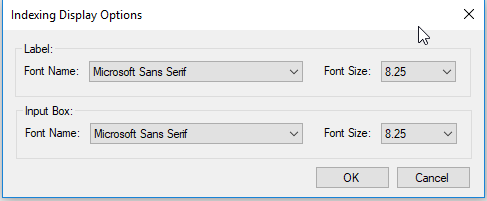
Once changes have been made, click OK. You will need to close and then re-open the indexing window for changes to take effect.
C. Best Practices
- Preview Changes: After selecting a new font size, briefly review how it appears in the Index window to ensure it meets your visibility needs before finalizing the change.
- Consistency Across Workstations: If working on multiple workstations, consider standardizing the font size across all to maintain consistency and reduce adjustment time.
- Accessibility Considerations: Choose clear, easy-to-read fonts and appropriate sizes that enhance accessibility for all users, including those with visual impairments.
D. Troubleshooting
Changes Not Taking Effect:
- Ensure that you click 'OK' to save your changes in the popup window after adjusting the settings.
- Remember to close and then re-open the Index window to refresh the interface and apply the new settings. Changes will not appear until this step is completed.
E. Related Articles
SCScan: Using an Invoice multiple times
SCScan: Adding a Document Type
Conclusion
Adjusting the text size in the SCView Index window is a simple yet effective way to enhance user experience and ensure data is easily readable and accessible. By utilizing the built-in customization features, users can tailor their work environment to suit their individual needs, contributing to improved accuracy and efficiency in document indexing tasks. Always remember to test new settings and make adjustments as needed to maintain optimal readability and functionality.