 | ||
How to E-mail an Encrypted PDF
- Log in to your SCView database.
- Click Search from the top menu.
- Use the available search filters to locate the document you need.
- Select the correct document from the search results.
- Preview the document to confirm it is the correct file before sending.
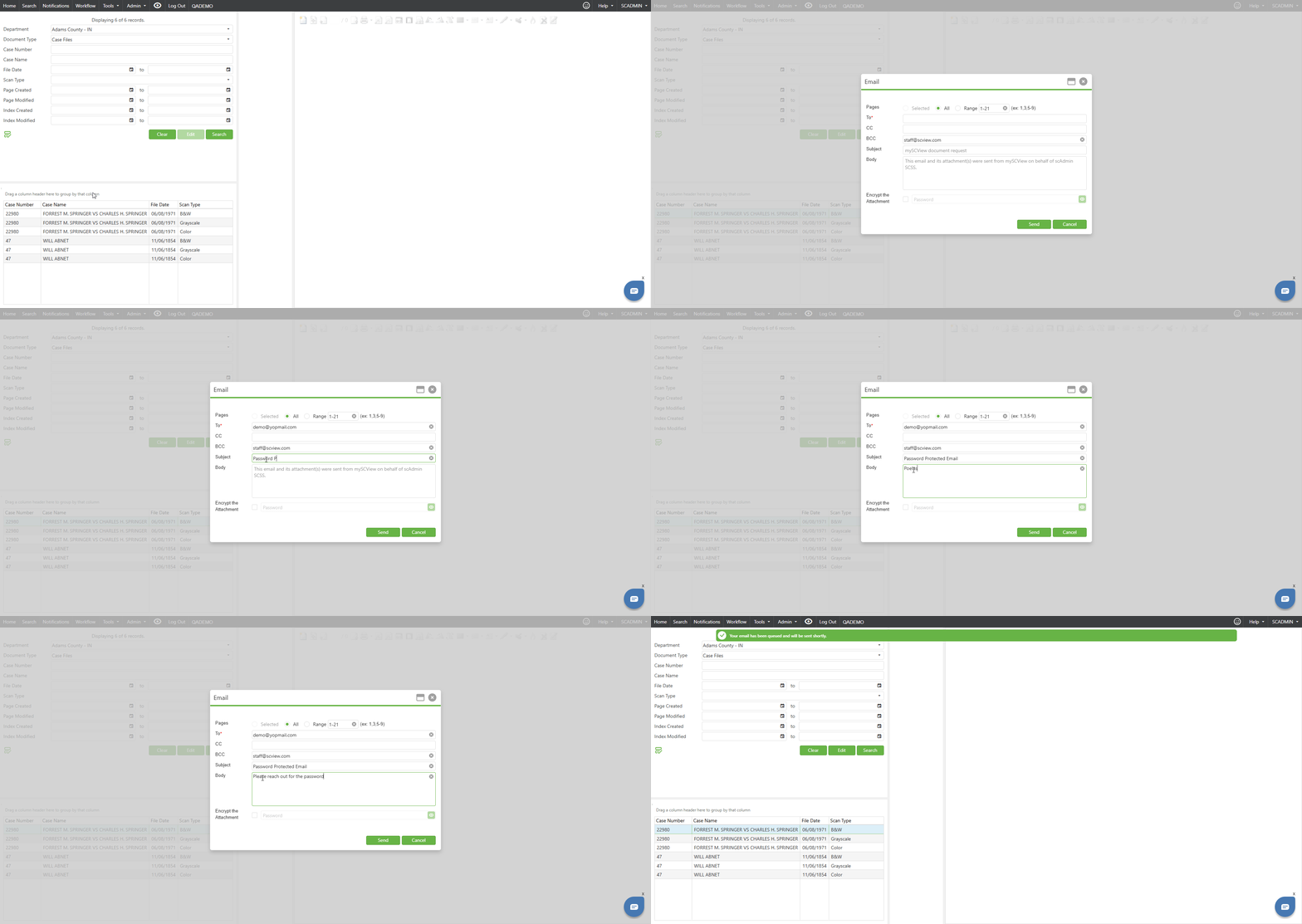
- Right-click the document title and select Email.
- In the email window, enter the recipient’s email address.
- Select the Encrypt the Attachment checkbox.
- Enter a password in the password field.
- Click Send.
Important Notes
- When encryption is selected, the password field becomes required. If a password is not entered, the email cannot be sent.
- For multiple recipients, separate email addresses with a semicolon and no spaces.
- The recipient will need the password to open the encrypted PDF. For security purposes, do not include the password in the same email as the attachment. Share the password separately, such as by phone, text, or another secure method.
Best Practice
Always preview the document before sending to make sure the correct information is being shared with the intended recipient.
Was this article helpful?
That’s Great!
Thank you for your feedback
Sorry! We couldn't be helpful
Thank you for your feedback
Feedback sent
We appreciate your effort and will try to fix the article