
 | ||
Introduction
In the dynamic environment of document management within SCView, instances occur where invoices might be indexed and submitted for approval multiple times, leading to duplicates in the system. This guide outlines the process for efficiently identifying and removing these duplicated invoices to maintain the integrity and accuracy of documentation within SCView.
A. Problem Statement
Duplicates in invoicing can clutter the system, complicate financial tracking, and lead to potential inaccuracies in financial reports. Particularly challenging are situations where batches from SCScan are accidentally uploaded more than once, or when invoices from these batches have already been processed through the Financial Information System (FIS), requiring manual intervention for removal.
B. Solution
Occasionally an invoice will get indexed twice and submitted to the workflow for approval. When this happens it is possible to remove the duplicates from SCView in order to maintain the documentation. The first step is to determine the scope of the duplications. If a batch from SCScan was accidentally uploaded twice, please notify support as soon as possible. Support is able to remove the entire duplicated batch from the system as long as none of the invoices have been processed through to the Financial Information System (FIS).
If there are duplicates that were indexed in multiple batches, or the duplicated batch has had some invoices processed through to the FIS, the duplicated invoices will need removed from SCView manually.
Removing from Workflow
- Navigate to the AP Workflow
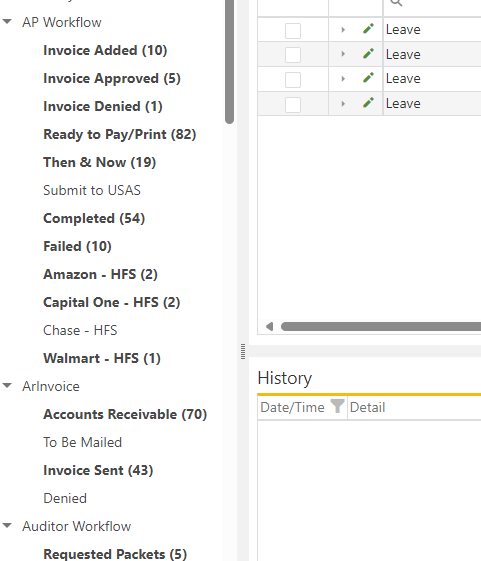
- Locate the duplicated invoices
- Take note of the PO number
- Remove the duplicate from workflow by either selecting "Remove from Workflow" or "Deny"
- If you selected "Deny" you will need to go to "Invoice Denied" and select "Remove from Workflow"


Removing Images from Packet
- Navigate to Search
- Select the "Financial Packet" Document Type
- Search the associated PO Number
- Locate the invoice page in the packet
- Right click the invoice and select "Page Group History"
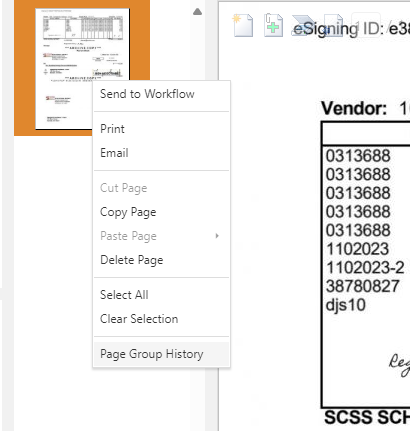
- Verify in the history that you selected the invoice you removed from workflow
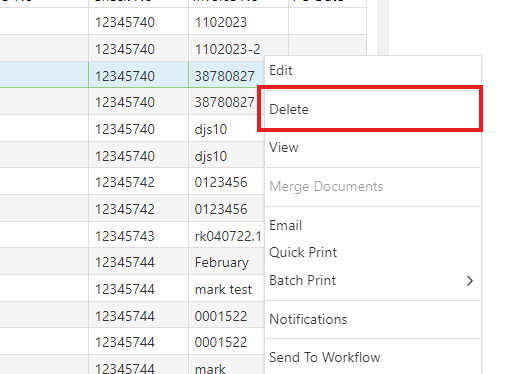
- Right click and select "Delete"
- If the option is not available you will need to contact your site administrator for "Delete" access
C. Best Practices
- Regular Auditing: Frequently review invoice entries and batches to promptly identify and address any duplications.
- Immediate Notification: Upon discovery of a duplicated batch, notify the support team immediately to facilitate quick removal of the entire batch from the system to prevent any processing errors.
- Access Controls: Ensure appropriate team members have necessary permissions, like "Delete" access, to manage invoice removal when needed.
D. Troubleshooting
- Duplicate Not Identifiable: If duplicated invoices are not clearly identifiable, use the Purchase Order (PO) number as a unique identifier to locate and verify duplicates.
- Deny and Remove Process: If "Deny" is used to remove an invoice from the workflow, ensure to follow through by going to the "Invoice Denied" section to "Remove from Workflow," preventing any pending actions on denied invoices.
- Deleting Invoice Images: If the "Delete" option for an invoice image in the packet is unavailable, verify your user permissions and contact your site administrator to grant the necessary access.
E. Related Articles
Invoices: How do I use the Invoice Manager (Invoices Tab) to Approve Invoices?
Conclusion
Effectively managing and deleting duplicate invoices in SCView is crucial for ensuring the accuracy of financial documentation and reports. By adopting best practices for regular reviews and immediate action, and by understanding the steps to manually or automatically remove duplicated entries, organizations can maintain a streamlined, error-free invoicing system. It is important to equip staff with the necessary tools and knowledge to handle such issues confidently, ensuring the integrity of the document management process.