
 | ||
Introduction
Effective document management in SCScan demands that each document within a batch is indexed properly. Indexing is crucial for ensuring that documents can be retrieved, managed, and tracked accurately within the system. However, users may occasionally encounter issues where documents within a batch remain unindexed, which can hinder subsequent processing steps.
A. Problem Statement
One frequent issue encountered in SCScan is the failure to index all documents within a batch. This problem can lead to discrepancies between the total documents and the indexed documents count, which can disrupt workflows, delay processing, and affect data integrity.
B. Solution
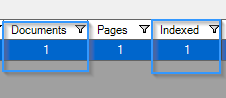
The most common cause for this is that a document is not indexed in your batch. In SCScan, check your batch manager to make sure everything has been indexed. The Documents should match the Indexed number. If not, follow the below steps:
1. Double-click your batch to open it
2. Click Search in the top middle of the screen

3. A dialog window will open. Check the second column for a status of "Unindexed". The number to the left is the document number that needs indexing.
4. Close the dialog
5. Click Index at the top like normal.
6. Click the document number on the left side that needs indexed and index like normal.
7. Follow standard procedure to close indexing and upload again.
C. Best Practices
- Regularly Check Index Status: Make it a routine to verify that the total document count matches the indexed document count after every scanning session.
- Immediate Correction: Address any discrepancies in indexing immediately to avoid complications with batch processing at later stages.
- Training and Guidelines: Ensure all users are adequately trained on the indexing process and understand the importance of completing this task for each document.
- Documentation of Procedures: Maintain clear, accessible documentation of the steps required for proper indexing as a reference for users to follow and ensure compliance.
D. Troubleshooting
Identifying Unindexed Documents:
- If the document count does not match the indexed count, utilize the Search feature to quickly find documents that are marked as "Unindexed".
- Be sure to review each unindexed document individually to ascertain why it was not indexed and rectify the issue.
Issues During Indexing:
- If problems arise while trying to index a document (e.g., system errors or unresponsive software), restart SCScan and attempt the indexing again.
- If the issue persists, check for updates or patches for SCScan that might resolve indexing bugs or improve functionality.
Errors Post-Indexing:
- If errors occur after indexing (e.g., failed uploads or processing errors), verify that all documents were indexed correctly and meet the required indexing standards.
- Consult the system’s error logs or support resources for specific error messages and troubleshooting steps.
E. Related Articles
Conclusion
Proper indexing is fundamental to maintaining an efficient document management system in SCScan. By adhering to best practices and promptly addressing any indexing discrepancies, users can ensure smooth workflow transitions and maintain high data integrity. Furthermore, understanding how to effectively troubleshoot common indexing issues will empower users to manage their document batches with greater confidence and reliability, enhancing overall productivity and system performance.