 | ||
Introduction
To streamline the process of time tracking for non-standard work assignments, many districts have begun implementing Time Sheets - Special Projects within their Unified Payroll and Personnel System (USPS). This feature aids in the differentiation between ordinary daily or full-time positions and those that are project-based or temporary, granting an enhanced level of oversight and control over the management of project-related labor hours.
A. Problem Statement
Managing and tracking time efficiently for special project positions poses a significant administrative hurdle. Districts face the problem of ensuring that employees working on special projects do not exceed the hours that have been authorized for those tasks. Without a proper system in place, there is potential for staff to inadvertently or intentionally claim compensation for time beyond what is sanctioned, leading to budget overruns and payroll discrepancies. These issues necessitate a robust solution that provides a clear framework for time tracking, applies validations to prevent overages, and maintains accountability among all personnel involved.
B. Solution
Admin Only Privileges:
Admins may view the status and balances of all special projects. To do so,
Step 1:
Navigate to Admin > Site Settings > Time Sheets
Step 2:
Click on Special Projects Review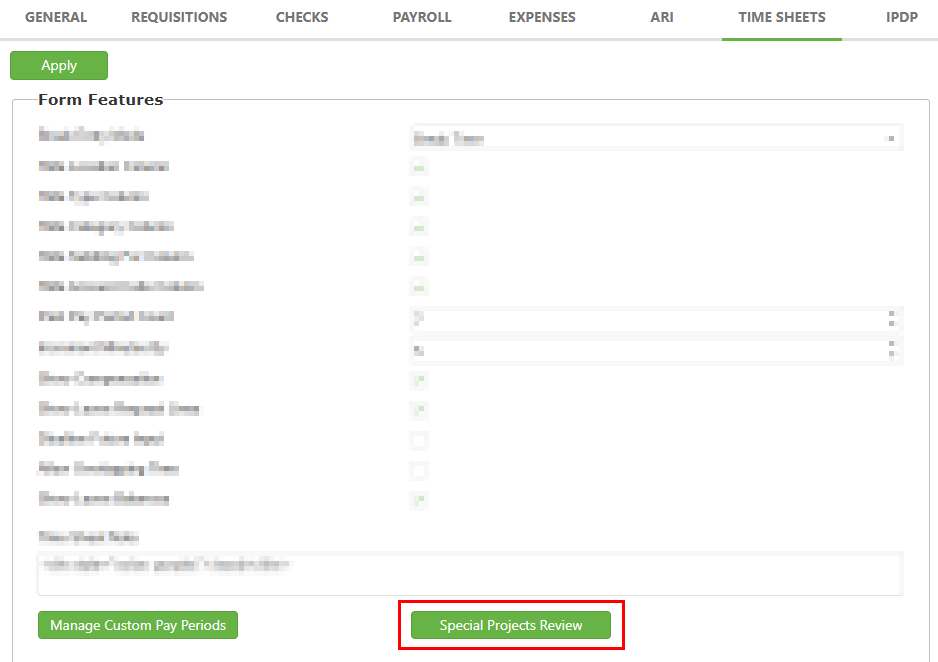
Step 3:
This table will display all useful and relevant information regarding each special project, both past and ongoing. You may simply view this information or export the data to a file.
Approved time sheet submissions will display in the grid as "Usage".
Approved special project requests from your Special Projects Custom Form will display as "Initial balance" when first setting up the special project. If you submit and approve the form again for the same Special Project, the grid will display this change as an "Adjustment". Adjustments may be positive or negative, and in any amount, but negative adjustments will fail validation if they attempt to make the Special Project's hours go negative.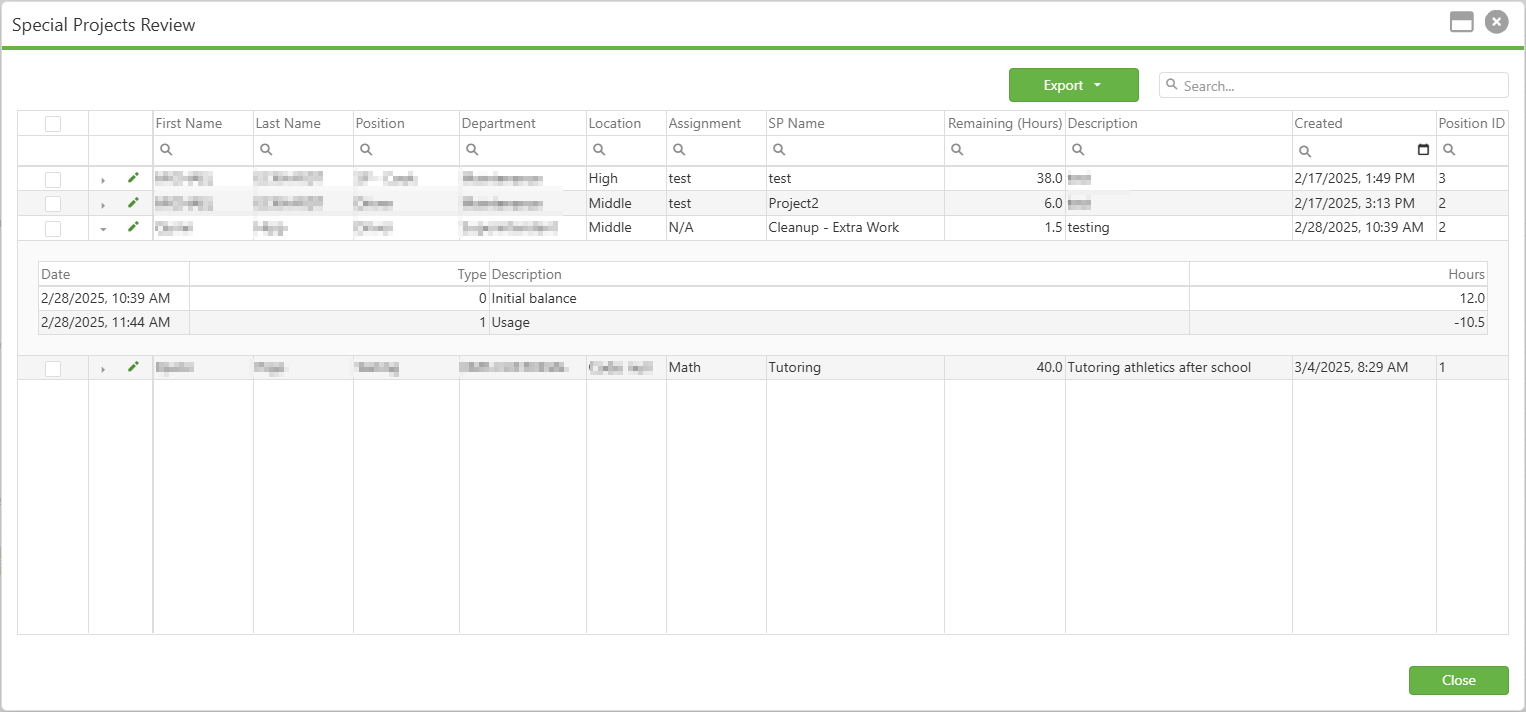
Step 4:
You may also edit a row by clicking the green pencil icon. Currently, only the Department, Location, and SP Name (Special Project Name) fields can be changed. Once updates are made, click Save.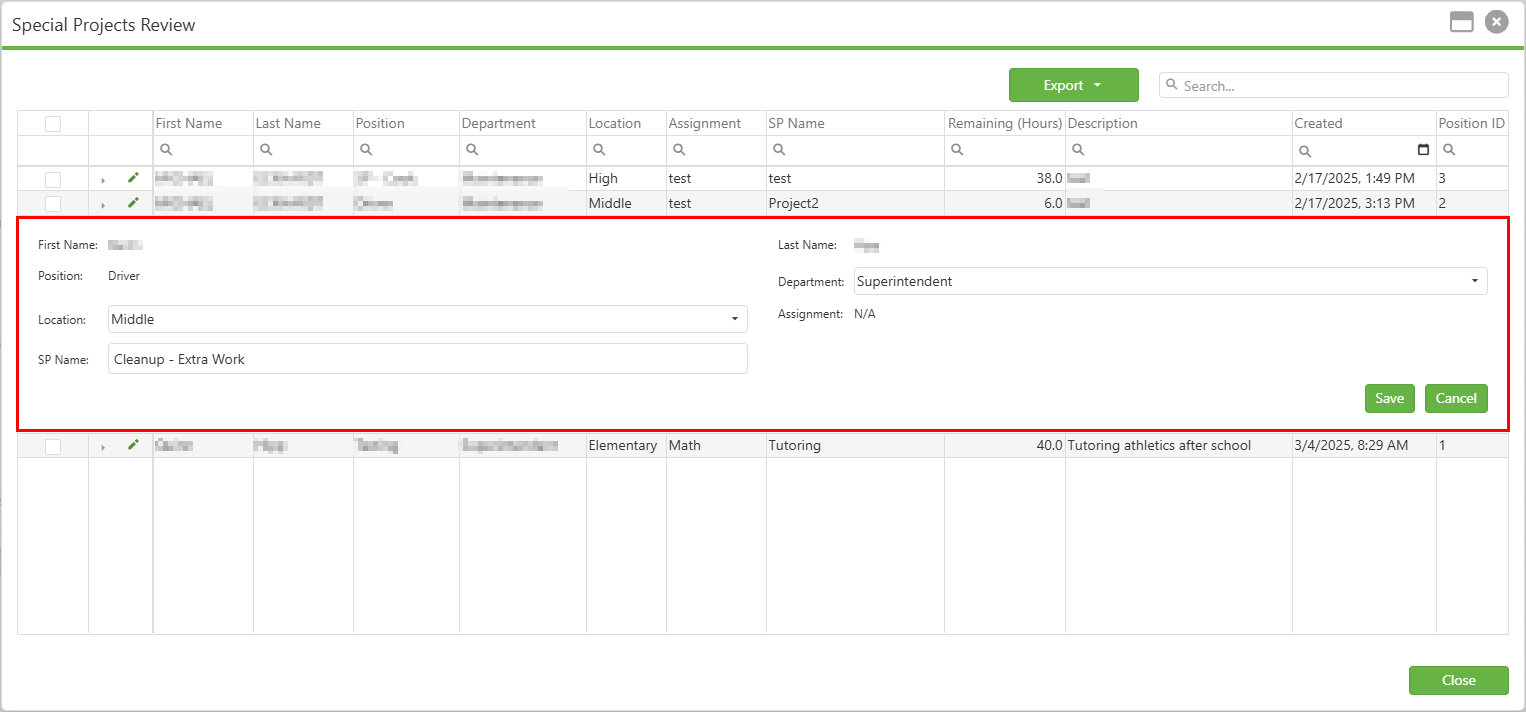
C. Best Practices
- Regular administrative review - Admins should frequently check Special Projects status via Admin > Site Settings > Time Sheets > Special Projects Review to monitor usage and prevent budget overruns
- Establish naming conventions - Create standardized naming formats for Special Projects (e.g., "DEPT-YYYY-ProjectName") to improve searchability and organization
- Train backup administrators - Ensure multiple staff members understand the Special Projects Review process to maintain continuity
- Communicate changes promptly - Notify affected employees immediately when project hours are adjusted or projects are closed
D. Troubleshooting
- Cannot apply negative adjustment (Admin) - Ensure the adjustment won't result in negative available hours; consider approving additional hours first before applying reductions
- Unable to edit Special Project information (Admin) - Remember only Department, Location, and SP Name fields are editable; clear browser cache or try a different browser if the green pencil icon isn't functioning
E. Related Articles
Time Sheets: Submitting Time Sheets for Approval
Conclusion
Adopting the Time Sheets - Special Projects feature is a strategic move for districts seeking to enhance their payroll accuracy and overall efficiency in managing special project positions. By having a tailored system to handle the unique aspects of these roles, districts can prevent overpayment, maintain budgetary control, and uphold the integrity of their payroll processes. It is imperative that this solution is implemented thoughtfully, following best practices and ensuring that all stakeholders are well-informed and comfortable with the system. With robust validation features and precise controls, the Time Sheets - Special Projects functionality stands as a testament to the organization's commitment to responsible time management and fiscal stewardship.
Was this article helpful?
That’s Great!
Thank you for your feedback
Sorry! We couldn't be helpful
Thank you for your feedback
Feedback sent
We appreciate your effort and will try to fix the article