 | ||
Introduction
In the complex environment of educational data management, SCView’s integration with ProgressBook is designed to streamline the process of student registration and information updating. This guide explains how SCView caches data from ProgressBook to speed up form loading times, avoid unnecessary wait times for responses, and ensure that data submission is both quick and reliable.
A. Problem Statement
Initial setup with ProgressBook requires synchronization of a vast array of student details, which can become cumbersome and slow if each detail is fetched in real-time during form operations. This can lead to delays and potential data entry errors when the data is not readily available, affecting efficiency and accuracy.
B. Solution
SCView addresses this challenge by caching essential data from ProgressBook locally on your system. This approach allows SCView forms to load faster and reduces dependency on real-time data fetching. By setting up smart caching and specific rules for data handling like smart deletes, automatic address matching, and prevention of data overwrites, SCView ensures that student data management is both efficient and reliable.
When your ProgressBook connection is initally established, we cache important information from the ProgressBook service so that your forms will load faster and we don't need to wait for a response from ProgressBook on certain items.
Navigate to Site Settings
Admin > Site Settings > SIS
On the ProgressBook section there are settings that can be enabled for ease of submission.
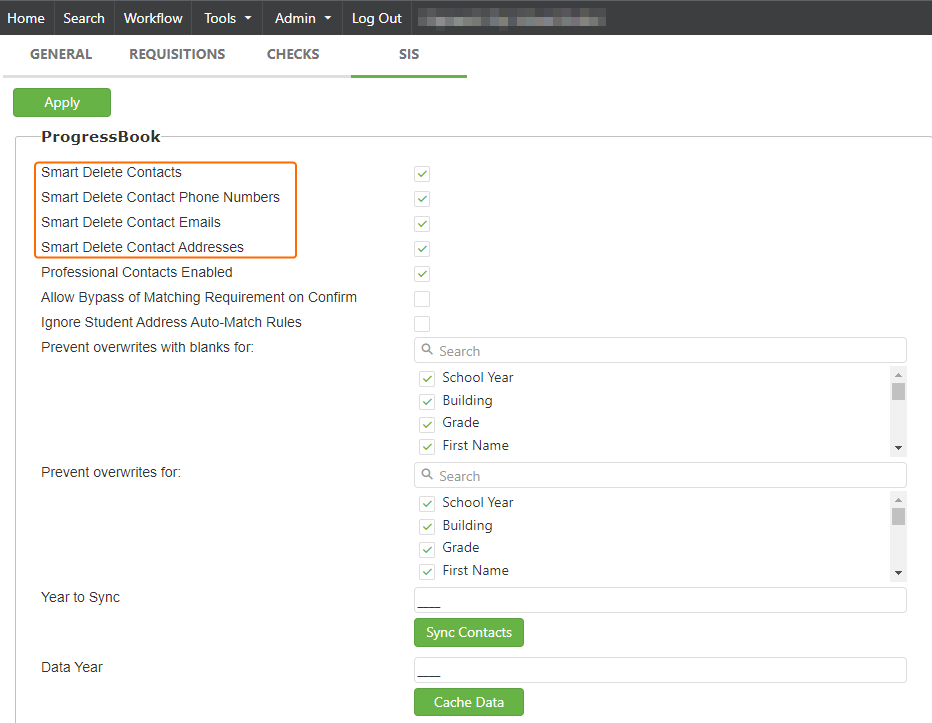
Smart Deletes (orange outline)
If enabled and the contact exists, update that contact only with changed values. If not, create new and populate as necessary.
If enabled, any contacts without a match should be flagged as deleted.
Ignore Student Address Auto-Match Rules - This is a flag on the contact for using 'same as', if it is marked it will autofill by default.
Prevent Overwrites with blanks for - this section lists out the values that can be submitted to ProgressBook. If there are blanks on the SCView side of the confirm screen but ProgressBook pulled in values this would prevent the ability over overwriting the PB values. Check mark the values you want to ensure are not overwritten.
*Note: This is when using the 'accept all' button on the confirm screen, however selecting them individually will allow for the overwrite.
Prevents Overwrites for - As the same action as Prevent Overwrites with blanks but this does not allow them to be overwritten individually either.
Year Sync - After the student promotion has been done in ProgressBook and the ITC has bumped students grade level, this will sync for our information to be updated for the upcoming school year.
Data Year - If you have made changes to your ProgressBook information within the ProgressBook portal, these changes are not immediately reflected in SCView because of this caching process. A full list of the type of data that we cache can be found below. You will also want to do this after the ITC has done the promotion of the student on their end.
Note: You must sync data before the year sync.
View the steps below to update your cache data:
- Navigate to Admin -> Site Settings
- On the General tab, you will see a ProgressBook section
- Type in the 4 digit year you wish to cache data for. If you do not enter a year, data will cache for the current calendar year.
- Click the Cache Data button
Once the button is pressed, the task will begin to cache data for the entered year.
Note: You will not be able to run another data cache process until the current
process has completed.
The following data is cached from ProgressBook:
OriginCountryCodes
HomeLanguageCodes
ContactTypeCodes
MedicalAlertsPriorityCodes
PhoneNumberTypeCodes
ProfessionalContactTypeCodes
BuildingProgressionTrackCodes
MilitaryStatusCodes
StateCodes
CountyCodes
CounselorCodes
GradRuleCodes
HomeSchoolIRNCodes
ProgramCodes
SchedulingPriorityCodes
AdmissionReasonCodes
SummativeRaceCodes
AttendanceCalendarCodes
EthnicityCodes
AdmissionCodes
AddressTypeCodes
NamePrefixCodes
LanguageCodes
EmailAddressTypeCodes
SchoolInfo
BirthdateVerificationCodes
ImmunizationTypeCodes
HispanicLatinoCodes
CitizenshipCodes
GradeLevelCodes
StudentStatusCodes
PhoneCarrierTypeCodes
C. Best Practices
- Scheduled Synchronization: Regularly synchronize and update the cached data, especially after any major updates or promotions within ProgressBook, to keep the local data store accurate and up-to-date.
- Data Year Setting: Always ensure that the correct year is set in the caching options to fetch relevant data for the appropriate academic period.
- Smart Deletes Activation: Enable smart deletes to ensure that only the necessary data is updated, reducing redundancy and enhancing data integrity.
- Prevent Overwrites: Utilize the overwrite prevention settings judiciously to ensure important data fields are not overwritten inadvertently, especially when using bulk accept actions on the confirm screen.
- Continual Monitoring: Keep an eye on the data syncing processes and system alerts to address any issues promptly.
D. Troubleshooting
- Data Not Updating: If the recent changes in ProgressBook are not reflected, ensure that the Data Year is set correctly and perform a manual cache update.
- Forms Loading Slowly: Check if the data cache needs refreshing and verify the network conditions, as slow network speeds might affect data fetching even from the local cache.
- Errors During Data Sync: If errors occur during the data sync process, check for messages indicating the nature of the error and consult SCView support if the issue persists. Ensure no duplicate caching tasks are running concurrently.
- Smart Deletes Not Working: Verify that the smart deletes option is enabled and configured correctly. Check that the data identifiers like PO numbers or student IDs match correctly between SCView and ProgressBook.
E. Related Articles
Student Manager – Students Tab
Conclusion
Effectively managing the caching of data from ProgressBook within SCView is crucial for maintaining high performance and accuracy in student registration processes. By adhering to best practices for data synchronization and applying the correct settings for data handling, educational institutions can leverage SCView to enhance their operational efficiency and data integrity. These measures ensure that SCView remains a robust and reliable tool for educational data management, tailored to the dynamic needs of academic institutions.
Was this article helpful?
That’s Great!
Thank you for your feedback
Sorry! We couldn't be helpful
Thank you for your feedback
Feedback sent
We appreciate your effort and will try to fix the article