
 | ||
1. Introduction
This guide explains how to modify the last purchase order number used in SCView, a critical administrative function for managing PO numbering sequences. This process is particularly important during fiscal year transitions or when correcting numbering sequences. Understanding proper PO number management ensures continuous and accurate purchase order numbering for your organization's financial tracking and compliance requirements.
2. FAQ
Q: Why would I need to change the last PO number used in SCView?
A: There are several scenarios where this might be necessary, including transitioning to a new fiscal year, correcting numbering sequences, or aligning with organizational numbering policies. This ensures proper sequential numbering for future purchase orders.
Q: Who can change the last PO number used?
A: Only users with administrative privileges can modify this setting. If you are an admin but don't see this option available, you'll need to contact support to have the feature enabled for your account.
Q: How do I access the PO number settings?
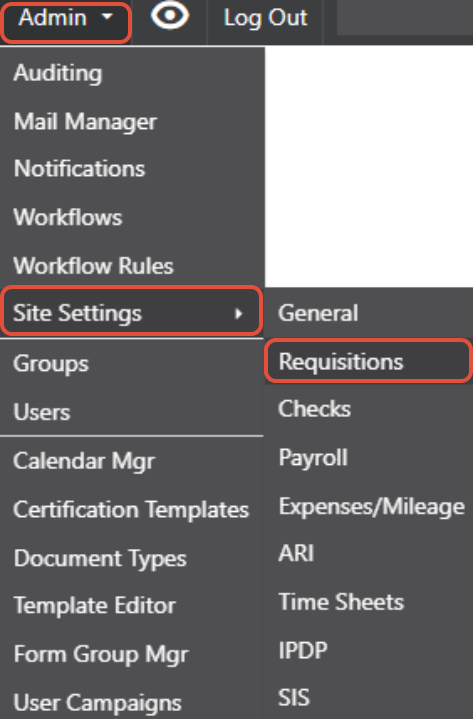
A: Navigate to Admin > Site Settings, then click on "Requisitions." This will display the configuration options including the "Last PO No" field.
Q: How do I set what the next PO number will be?
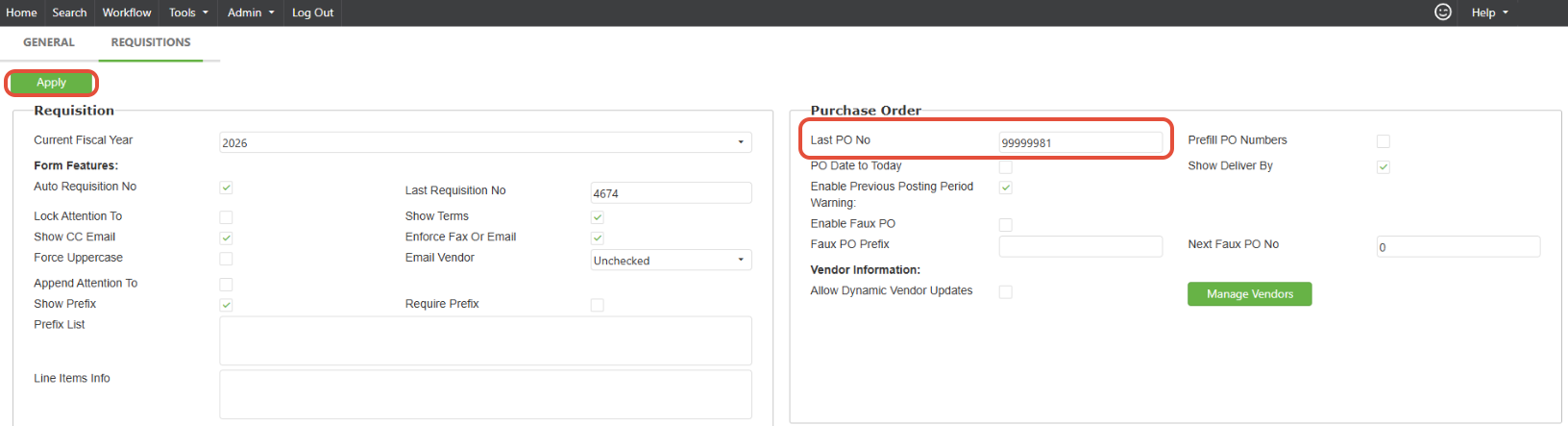
A: In the "Last PO No" field, enter the number that should be considered the last used number. For example, if you want the next PO number to be 21, you would enter 20 in the "Last PO No" field, then click "Apply."
Q: What's the difference between the "Last PO No" and the next number that will be assigned?
A: The "Last PO No" represents the most recently used number. SCView will automatically assign the next sequential number after this value. So if you set "Last PO No" to 20, the next PO created will be numbered 21.
Q: I'm an admin but don't see the PO number setting. What should I do?
A: Contact SCView support via chat or email at support@scview.com to have this feature enabled for your administrative account.
Q: When should I typically change the last PO number?
A: Common times include the beginning of a new fiscal year, after importing data from another system, or when implementing new organizational numbering standards.
Q: Will changing this number affect existing POs?
A: No, changing the last PO number only affects future PO numbering. Existing purchase orders will retain their current numbers and remain unchanged.
3. Related Articles