 | ||
Introduction
In managing user accounts on SCView, it is vital to approach account modifications with care to preserve the integrity and security of data. Particularly in situations where an account may no longer be active, it is advised to disable rather than delete the account, allowing for data retention and potential future reactivation.
A. Problem Statement
Deactivating an SCView user account is sometimes necessary, but deletion is a permanent and drastic step that results in the irreversible loss of data and history. This can complicate user management, compliance tracking, and data integrity.
B. Solution
As a preferred alternative, disabling a user account on SCView ensures that the user cannot access the system while maintaining their data record intact. This method is ideal for temporary deactivation or keeping a record of past users.
We do not recommend deleting a user's account. Instead, recommend disabling the account. Doing this, the user will not be able to login, no matter their permissions.
Note: You must be an Admin in order to do this
1. Confirm you have Administrator rights on SCView to modify user accounts.
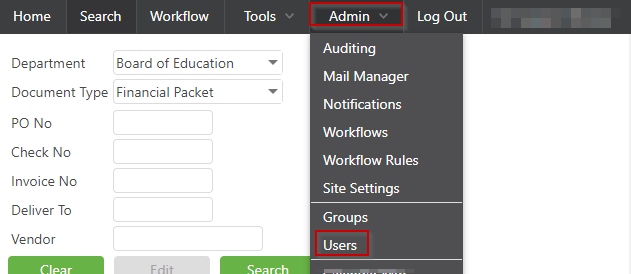
2. Navigate through the platform by going to Admin -> Users.
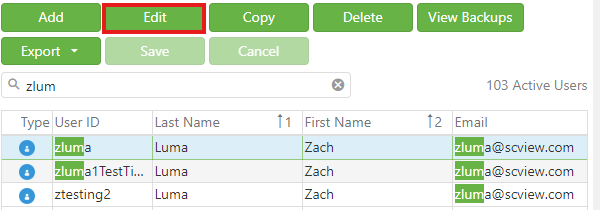
3. Select the user account you need to modify by clicking on it, then choose 'Edit.'
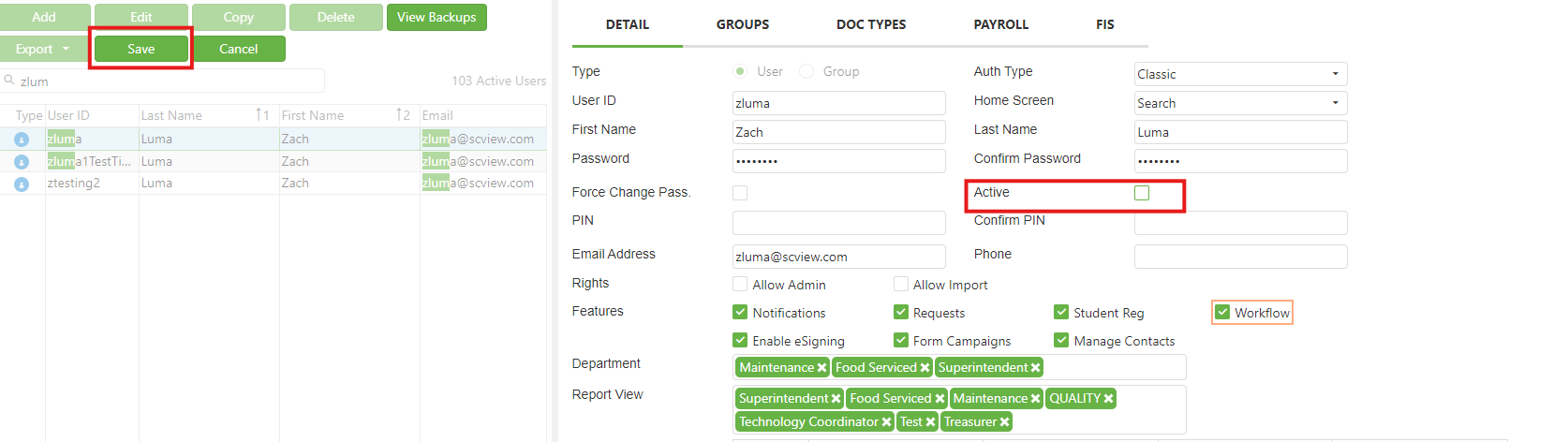
4. Find and uncheck the "Active" checkbox to disable the account.
5. Save the changes by clicking 'Save.'
C. Best Practices
- Verify Permissions: Ensure the operator has appropriate admin rights before making changes to any accounts.
D. Troubleshooting
- Verify that the user making changes has been granted Admin status.
- Double-check to make sure the changes were properly saved—revisit the "Active" status under user settings post-saving.
E. Related Articles
Users - Change owner or requestor
Users: Setting Up Account Filtering
Users: User Manager - Add and Edit
Conclusion
Disabling user accounts on SCView is a more secure and reversible approach than account deletion. It allows organizations to manage their user base effectively without losing valuable data or violating compliance needs. By following these guidelines and employing best practices, SCView administrators can safeguard user data and maintain a robust, secure user management system.
Was this article helpful?
That’s Great!
Thank you for your feedback
Sorry! We couldn't be helpful
Thank you for your feedback
Feedback sent
We appreciate your effort and will try to fix the article