
 | ||
Introduction
SCView provides flexible and intuitive options for making selections across different modules and functions, catering to various user preferences and requirements. Understanding the selection methods available can greatly improve your efficiency in managing workflows, searching, and handling large data sets within the system.
A. Problem Statement
Users unfamiliar with SCView might find it challenging to navigate and utilize the selection methods effectively, potentially leading to inefficiencies or errors in data handling. Each selection method has its specific application and knowing when and how to use them is crucial for optimal system utilization.
B. Solution
SCView offers three primary methods of selection to accommodate different user needs: Checkbox/Check all option, Clicking, and Combination of both. Recognizing and applying these methods appropriately can streamline tasks, enhance data manipulation, and improve overall workflow management.
In SCView, there are three primary ways to make selections:
- Checkbox/Check all option - ex: Workflow uses this option
- Clicking - ex: Lower left grid on the Search screen uses this option
- Combination - ex: PO Manager uses a combination of both options
Checkboxes:
There are two ways to select with checkboxes:
Individually - Simply check each box on the left of the row you would like to select
All - At the top of the column of individual checkboxes, there is a master checkbox. This master checkbox can appear in one of three states, each reflecting the current selection status. You can click this master checkbox to select all rows simultaneously, and clicking it again will clear the selection from all rows.
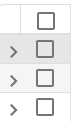
Unchecked - No rows have been selected. Clicking the box in this state will select all items
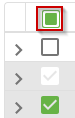
Filled in with a square - Some rows are selected, but not all. Clicking the box in this state will select all items
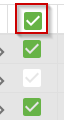
Checked - All rows have been selected. Clicking the box in this state will deselect all items
For Clicking:
There are 3 primary clicking methods:
Single selection - simply left-click an item to select it as the only item
Single multi-select - Similar to the single selection, this allows one additional selection each click. To perform this type of selection, hold down CTRL+Left-click for each item you want to select/deselect
Range select - To select a range, first select one end of the range of items. Then, hold down Shift+Left-click on the other "end" item to select it and all values in between the two ends.
C. Best Practices
- Understand Context Usage: Familiarize yourself with where each selection method is most effectively used in SCView, such as using checkboxes in Workflow management for bulk actions, and direct clicking in the Search screen for precision selection.
- Efficient Bulk Operations: Utilize the ‘Check all’ option for performing bulk operations efficiently. This is especially useful in scenarios like selecting multiple records for updates or analysis.
- Diverse Selection Needs: Use the CTRL+Left-click option for selecting multiple, non-consecutive items, and the Shift+Left-click for selecting a range of consecutive items, which is useful in sorting and organizing data.
D. Troubleshooting
- Selection Not Working: Ensure your mouse and keyboard are functioning correctly. Refresh the page if you believe the system isn’t responding to your commands.
- Issues with Shift or CTRL Keys: If Shift+Click or CTRL+Click actions are not responding, check your keyboard settings or try a different keyboard to rule out hardware issues.
- Confusion Over Selection State: If you’re unsure about the selection state, look at the checkbox. A filled square indicates a partial selection, an unchecked box indicates no selection, and a checked box indicates full selection.
E. Related Articles
Conclusion
Mastering the selection techniques in SCView can significantly enhance your productivity and accuracy in handling data within the system. By applying the best practices and becoming adept at troubleshooting common issues, you can take full advantage of SCView's capabilities, ensuring thorough and effective data management across various modules. Whether managing workflows, searching databases, or configuring settings, the right selection method can simplify your tasks and lead to better outcomes.