
 | ||
Introduction
In any organization, tracking the history of financial documents such as requisitions and invoices is critical for maintaining transparency, accountability, and compliance. SCView provides a robust feature called Document History, which allows users to view comprehensive audit trails for such documents. This guide outlines how to access and utilize the Document History for auditing requsitions and invoices through SCView, ensuring users can effectively trace and review past transactions and activities.
A. Problem Statement
Without a clear and accessible audit trail, organizations may struggle with financial discrepancies, lack of compliance with audit standards, and challenges in tracking document modifications over time. This can lead to errors in reporting, difficulties during audit periods, and potential financial losses.
B. Solution
SCView's Document History feature addresses these issues by offering a straightforward method to access the full history of requisitions and invoices. By providing options to view detailed changes, approvals, and updates directly from the Tools or Search tabs, users can quickly and accurately verify the integrity and history of their financial documents.
If we are looking for Requisition history, we can view what is called the Document History through 1 of the following 2 different methods. If we are looking for Invoice history, we can use option 2 below.
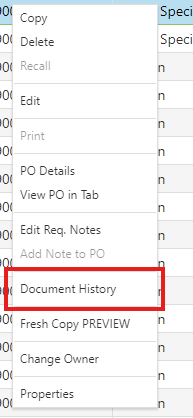
1. We can go to Tools > Requisitions or Tools > Purchase Orders. Right click on the item and choose Document History. It will show the same auditing as we would see when the item is in the workflow.
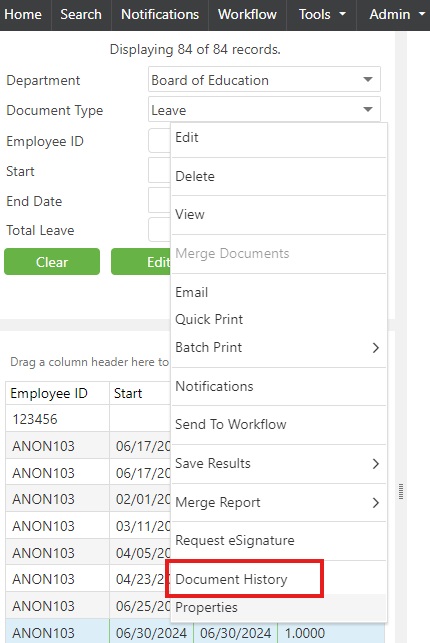
2. The same applies when using the Search tab. When we find the record, we are looking for, we can right click on the result and choose Document History to see the same results.
C. Best Practices
- Regular Auditing: Make it a routine practice to check the Document History of critical documents to ensure all transactions and modifications are well-documented and legitimate.
- Train Employees: Ensure that all relevant employees are trained on how to access and interpret the Document History to promote transparency and vigilance in document handling.
- Utilize Both Methods: Familiarize yourself with both methods of accessing the Document History to be versatile in tracking document changes via different access points within SCView.
D. Troubleshooting
- Access Issues: If you are unable to access the Document History, check your user permissions and ensure you have the requisite rights to view these details. Contact your system administrator for access adjustments.
- Missing History Records: If certain actions or modifications do not appear in the Document History, ensure that all system activities are configured to be logged. If the problem persists, contact SCView support for a system audit and possible bug fixes.
E. Related Articles
Conclusion
The ability to monitor and audit the history of requisitions and invoices confidently through SCView's Document History feature is an invaluable asset for any organization focused on maintaining stringent financial controls. By leveraging this function according to the outlined best practices and troubleshooting common issues effectively, organizations can enhance their operational integrity and ensure compliance with relevant financial and audit standards. Engaging with Document History not only simplifies the audit process but also fortifies the organization's commitment to transparency and accountability.