
 | ||
Introduction
For certain users within an organization, the capability to transform a requisition into a Purchase Order (PO) in the Uniform School Accounting System (USAS) is a critical function. This guide offers a straightforward approach to perform this task, catering specifically to those with access to the relevant submission queue.
A. Problem Statement
Users with the necessary permissions often need to submit requisitions for conversion into POs within the USAS, but the process can be intricate. Efficiently navigating through system workflows and ensuring error-free submissions is vital for maintaining the procurement cycle's continuity.
B. Solution
Submitting Requisition to USAS
To successfully submit a requisition to USAS and convert it into a PO, follow these steps:
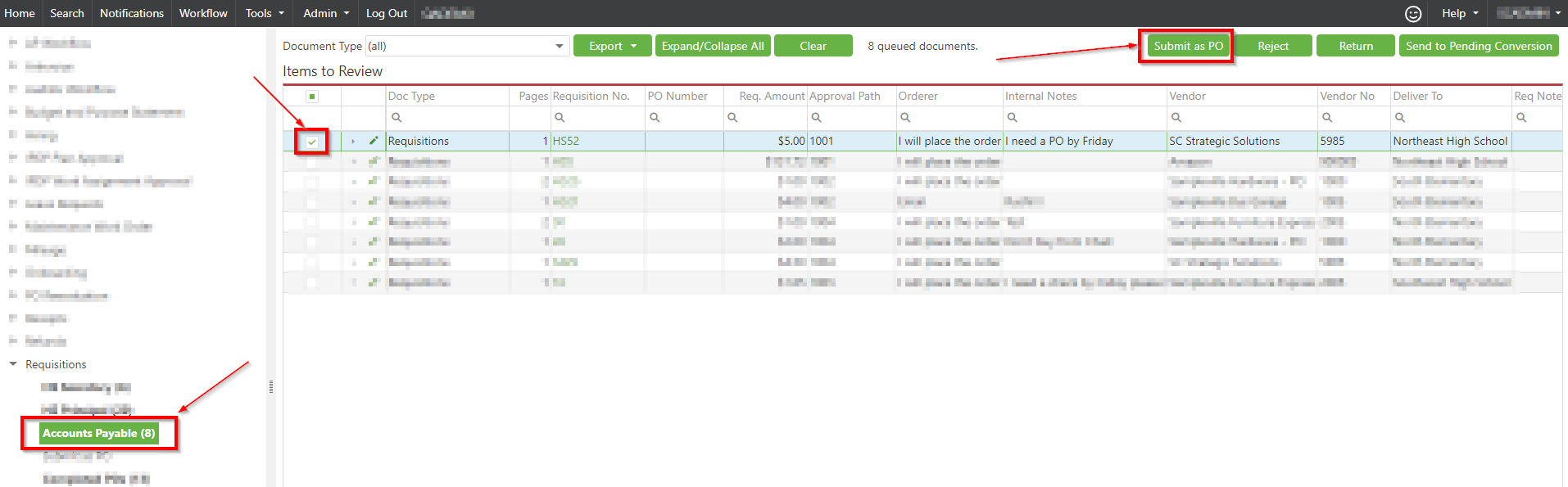
- Navigate to Workflow and access the requisition submission queue.
- Select the requisition(s) you intend to submit by checking the corresponding box(es) and click 'Submit as PO'.
- On the confirmation screen, make any necessary edits directly within the fields. Acknowledge any warnings (orange) or errors (red) by hovering over them for details. Once cleared, click 'OK' to proceed with the submission.
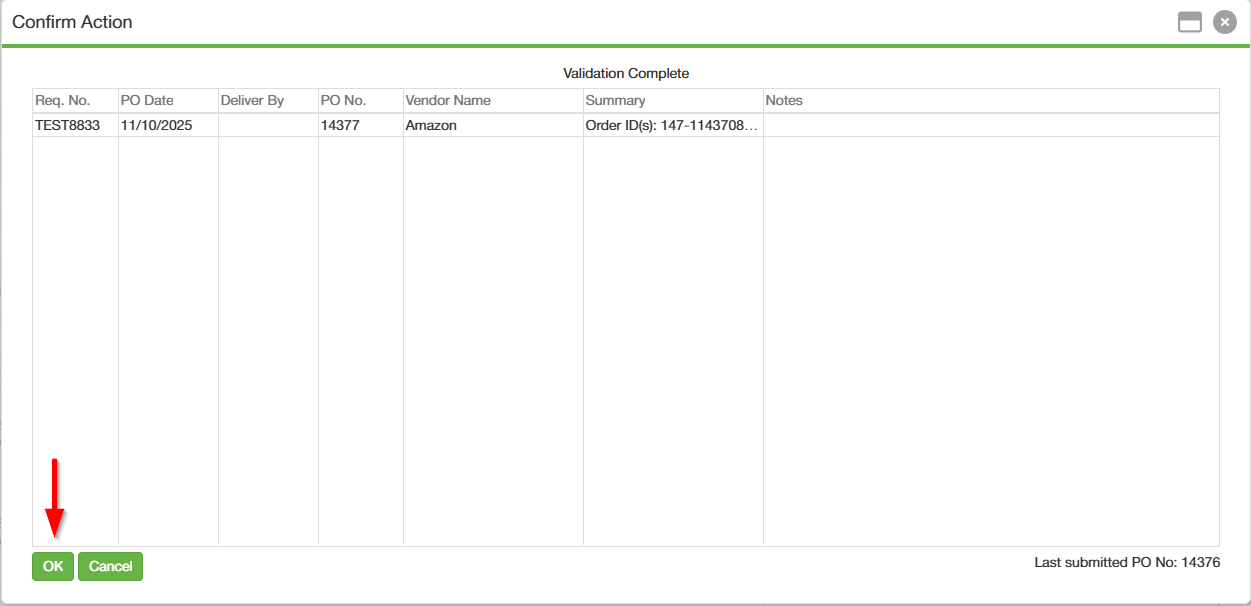
Requisitions will move to a hidden queue to be converted, which can take some time.
Updating Multiple Requisitions at Once
Multiple requisitions can be updated at once. This can be useful if you have several requisitions that were not approved before the month had closed in USAS, as the PO dates will need changed before they can be submitted. To do this:
- Edit and update the PO Date on the first line item on the Confirm Action popup.
- Once updated, right click the line and select "Apply PO Date to End".
- Click "OK" to submit the requisitions to USAS.
C. Best Practices
- Double-check requisition details for accuracy before submission.
- Keep an eye on indicators such as the orange highlight for warnings and the red for errors to minimize the risk of unsuccessful submissions.
- Maintain a record of the requisition IDs being submitted for easier tracking if issues arise.
D. Troubleshooting
If the requisition does not change status after 15 minutes, or if an error prevents the submission from proceeding:
- Review the detailed warning or error message upon hovering over the highlighted cells.
- Make sure you followed all the best practices mentioned above before reattempting the submission.
- Contact your system support team if the issue persists.
E. Related Articles
Requisitions: Create a Requisition
Conclusion
Converting requisitions to POs through USAS is a critical step in the procurement process for those with queue access rights. Adhering to this guide ensures that submissions are accomplished smoothly, enabling the timely procurement of goods and services. Always be proactive in resolving any hiccups during the process by following best practices and knowing when to seek support, ensuring that the financial operations remain efficient and uninterrupted.